


Активность
Сегодня
-
Вчера
bankamer изменил фотографию своего профиляПоследняя неделя
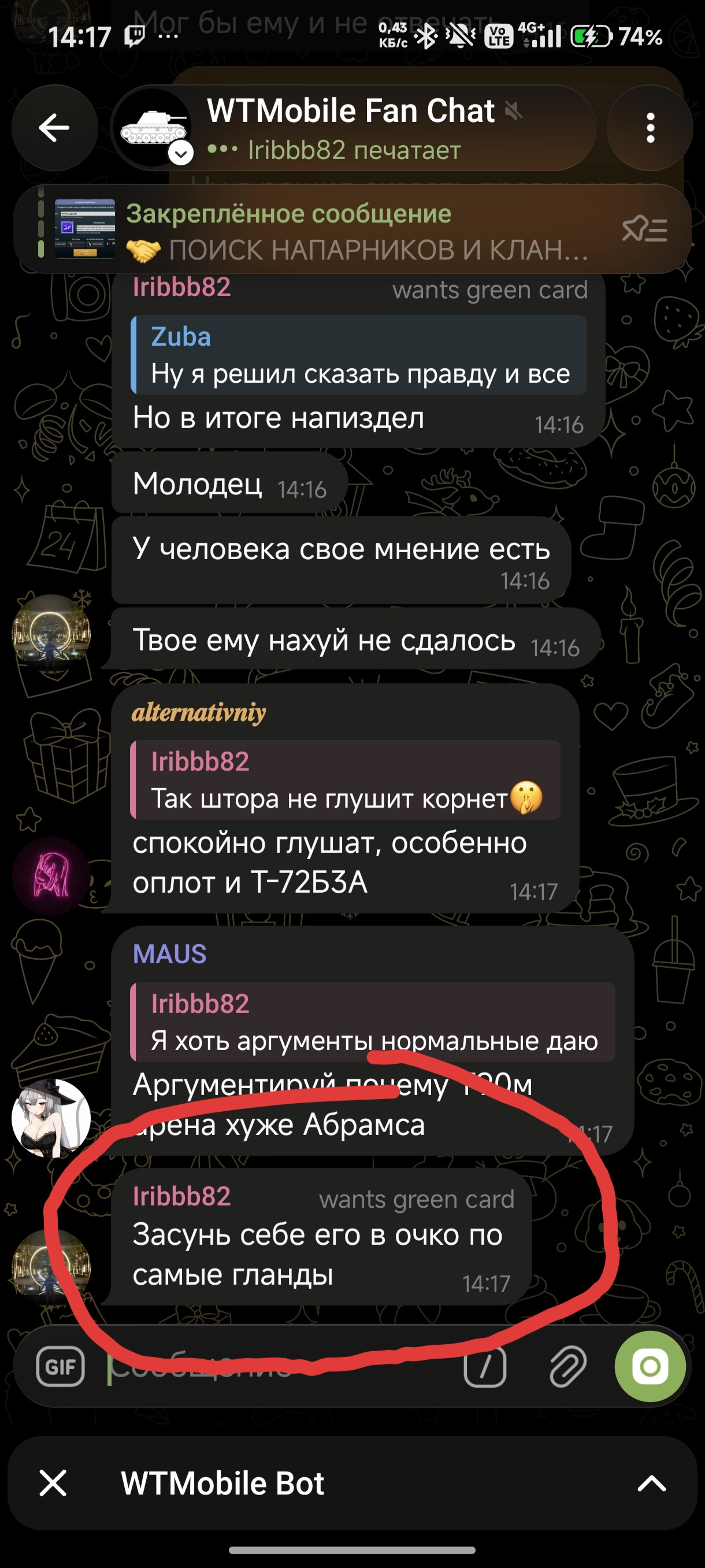
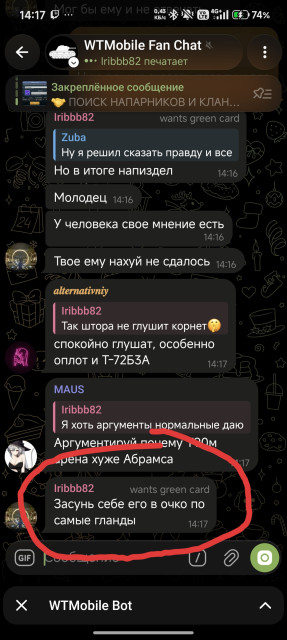
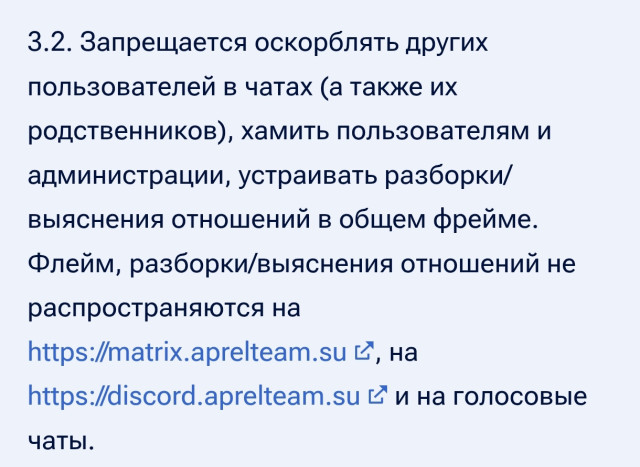
Я являюсь участником чата по War Thunder mobile, и пользователь @iribbb82 начал мешать общению в чате и засорять чат, если посмотреть на правила чата то он нарушил правила 3.2 и 3.8 прошу с этим разобраться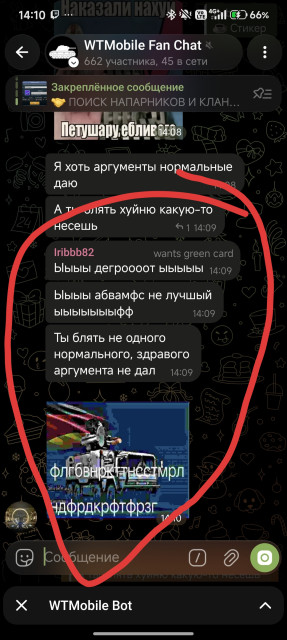


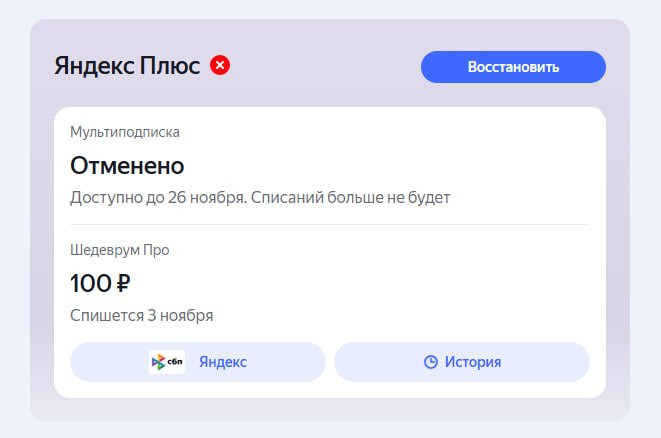
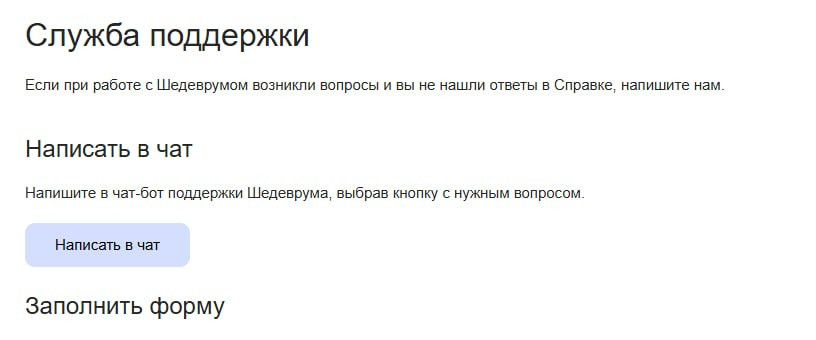
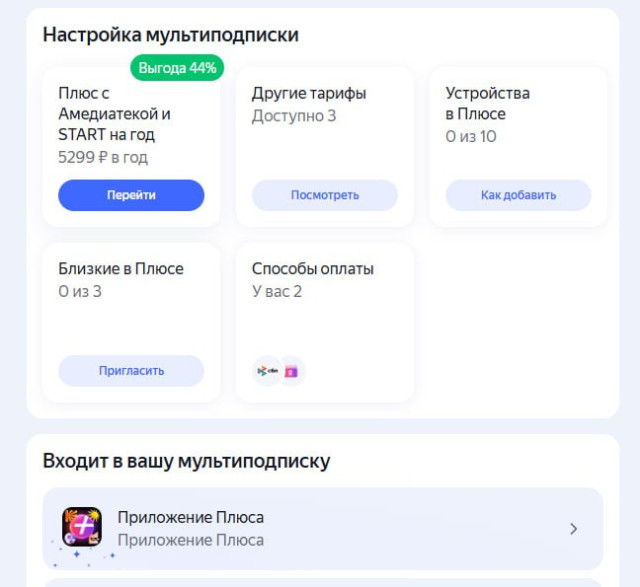
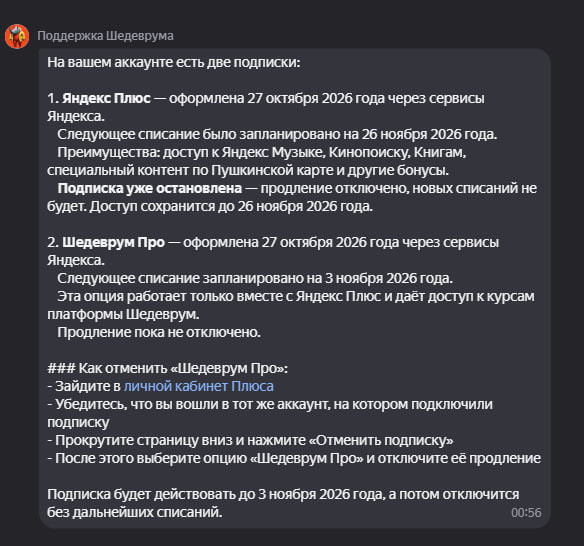
 dieealonee изменил фотографию своего профиляNyanyapilesosdasuka изменил фотографию своего профиляВыскочила короче в Шедевруме плашка бесплатной подписки Про, нажала и она подключилась, решила отменить обычную подписку, все знают что чтобы её отменить нужно проделать 7 кругов ада, много раз подтверждать и так пока не появится Отменено, если на каком-то этапе не продолжить отмену, то она не будет отменена Короче обычную отменила, а тот самый Шедеврум Про остался, в самом сервисе этих настроек вообще нихрена нет, в меню Плюса тоже, просто висит факт того что спишут 100 ₽, а при переходе везде или карта или предложения купить другие Обратилась в поддержку Яндекса, там бот, нихера не помог Обратилась в поддержку Шедеврум, там тоже бот. Навёл меня на страницу плюса, где стандартная отписка https://yandex.ru/support/shedevrum/ru/feedback И наконец-то!!! Яндекс, какие же вы падлы конечно!!!




Ещё раньше
Jeleynn изменил фотографию своего профиляOpera GXOpera GX — специальная игровая версия браузера Opera. В ней реализованы уникальные функции, такие как ограничение использования ресурсов ЦП, оперативной памяти и сетевого трафика, помогающие играть и просматривать веб-страницы с максимальным удобством. Моды для Opera GX от Aprel Team https://store.gx.me/ru/mods/?studioId=b3f5872f-1e30-4a6a-a7e0-18de96953743OperaOpera — веб-браузер и пакет прикладных программ для работы в Интернете, выпускаемый компанией Opera Software.Opera AirOpera Air — первый веб-браузер для медитации и релаксации. Как и в Opera GX есть фоновая музыка. В наличии различные бусты и не только.Opera NeonOpera Neon — первый полноценный агентный браузер с искусственным интеллектом, который не только отвечает на вопросы о веб-страницах, но и помогает выполнять задачи: искать информацию, работать с формами и бронированиями, создавать сайты, игры, код и отчёты по текстовому запросу. При автоматизации действий на открытых страницах браузер анализирует структуру сайта, включая DOM и данные макета, а некоторые задачи выполняет в облачной виртуальной среде. Работа над ними может продолжаться, даже если пользователь отключится.ave изменил фотографию своего профиляVlorbik изменил фотографию своего профиляMiakoto231 изменил фотографию своего профиляЧто такое SIEM, если по-простому SIEM(Security Information and Event Management) - это система, которая анализирует события на информационных ресурсах компании, смотрит их логи, находит закономерности, выстраивает цепочки, чтобы вовремя обнаружить подозрительную активность и успеть предпринять меры для блокировки атак. Нормально, если вы 3 раза пытаетесь залогиниться в винде, 2 раза из которых забыли сменить раскладку. Нормально, если это происходит в пятый или даже в десятый раз с интервалом в несколько секунд. Но если вы дрочитесь по 30 раз в секунду в попытках залогиниться, на 1001-й раз за минуту в логах отображается успешный вход, это определенно повод поволноваться. Вот как раз SIEM распознает это как подозрительную активность, передаст информацию о том, что происходит с вашим аккаунтом SOC-аналитикам, чтобы они блокнули вашу учетку к херам от греха подальше. Для справки: SOC (Security Operation Center) - это толпа инженеров разной квалификации, которые надрессированы работать с SIEM-системами и в идеальном случае знают, как реагировать на атаки, как распознавать ложные сработки этой системы и как неистово выебываться в IT-комьюнити. Злой рок, в конечном счете, привел меня к необходимости самостоятельно разобраться с халявными решениями SIEM. Коммерческие лицензии, надо сказать, стоят просто нереальных денег, я до стольки еще считать не научилась. Не на пустом месте, конечно. Однако, жизненный путь тернист, а судьба неудачника - бесплатный цирк для богов. И вот я знакомлюсь с Wazuh - SIEM-система с открытым исходным кодом. Вертится она у меня на обычной Ubuntu 24.4.5 TSL - виртуалочке,которая автозапускается вместе с виндой. Выглядит приятно, а при базовой настройке правил корреляции даже неплохо так отрабатывает. Есть 6 гигов ОЗУ, а на диске надо выделить около 80. За 3 месяца они будут забиты и придется очищать. Ну, начнем с настройки. Wazuh на сегодняшний день стабильно работает на Ubuntu 24.4.0 версии. На 26-й может отрыгнуть. Так что, я решила не рисковать, нервов и так уже не осталось и поставила эту вундервафлю по гайду от разрабов. Работаю с Oracle, так что для VMWare-поклонников инструкции будут немного другими. Важно на виртуалке выделить не менее 6 гигов оперативки (6144 GiB) и не менее 4 ядер процессора. Я ставлю Wazuh на ноутбук (бегите, я бешеный), потому у меня нет необходимости в доступности SIEM снаружи, зато есть необходимость не дрочиться с постоянным редактированием конфигов из-за динамичного ip. Так что я сразу же даю виртуалке 2 сетевых атаптера. Один NAT, второй "Виртуальный адаптер - VirtualBox Host-Only Ethernet Adapter" и тараканю править конфигурации Через ip a узнаем имена виртуального адаптера. Там будет, скорее всего enp0s8 без адреса. Пугать это не должно. Адрес назначается легче легкого (если б не нейросеть, то ебалась бы 3 дня в попытке разобраться, какого хера просиходит и почему сраный ip не появляется) . Создаем файл настроек: sudo nano /etc/netplan/60-hostonly.yaml и внутри вводим это: network: version: 2 ethernets: enp0s8: addresses: [192.168.xx.xx/24] * *Вместо xx поставь че-нибудь свое. По типу 67.67 Важное замечание: Отступы - это не TAB, это строго 2 пробела. Отступы важны. Они должны быть ИМЕННО ТАКИМИ, И НИКАКИМИ ДРУГИМИ. Применяем настроечки: sudo chmod 600 /etc/netplan/60-hostonly.yaml sudo netplan apply Проверяем, что у enp0s8 появился тот адрес, который назначили через ip a Ну, собственно, теперь ставим wazuh. Ставится одной командой: curl -sO https://packages.wazuh.com/4.14/wazuh-install.sh && sudo bash ./wazuh-install.sh -a В конце будут креды. Че т типа такого: User: admin Password: какой-то_длинный_пароль Их надо сохранить. Это креды от веб-панели. Если пароль "потеряется", то можно его опять достать: sudo tar -O -xvf wazuh-install-files.tar wazuh-install-files/wazuh-passwords.txt В Веб-панель заход стандартный: https://192.168.xx.xx Логин-пароль Выше. Дальше надо будет поставить агента (херню, которая будет собирать все ваши события с тачки) В менюшке слева ищете Agents Managers -> Summary. Справа "Deploy new agent" Дальше по форме надо заполнить параметры: Deploy new agent Select the package: Windows, MSI 32/64 bits (если винда, а так там 3 варианта ОС) Server address: 192.168.xx.xx; Agent name (в дополнительных настройках): любое имя латиницей без пробелов; группа default. Сгенерируется 2 команды. Нужна та, которая начинается с Invoke-WebRequest (для винды). Для Linux начинается с wget. Эту команду надо запихнуть в командную строку. В моем случае в PowerShell. Агент утсановится, а дальше для виндв надо прописать: NET START Wazuh Это служба только что загруженного агента. Если косяков по пути нигде не было, то в веб-панели появится созданный агент с зеленой лампочкой в состоянии Active Протестить работу можно, создав и удалив пользователя. В новорожденной SIEM появятся события с уровнем угрозы >7 net user hacker Test12345! /add net user hacker /delete Отобразится хрень в Treat Intellegence (левая менюшка) -> Treat Hunting -> Events. Далее надо очень плотно и потно настраивать эту систему. В целом, она может анализировать любые логи, какие захотите ей кормить в режиме "онлайн". Главное, суметь настроить. Для отслеживания состояния компа лучше сразу качнуть Sysmon (бесплатная утилита Microsoft, которая записывает подробности о том, что происходит в системе: какая программа запустилась, кто её запустил, куда она подключается по сети) и начать кастовать правила. Когда нормально корреляция будет настроена, можно сделать интеграцию с почтой и телегой, что б туда сливались особо серьезные алерты. В целом, штука классная, потому что бесплатно, без лишней мозгодрочки, помогает отслеживать события в системе, смотреть, когда, где, куда именно и какой именно, был скачан майнер. Также он через Vulnerability Detection помогает отслеживать, какие проги надо обновить и какие уязвимости есть в текущих версиях, ибо в него подружается БД CVE-шек. Также можно найти какой-нибудь опенсурсный WAF, кидануть в него трафик своего сайта и слить логи в этот же Wazuh и даже отслеживать события ИБ на уровне веб-приложения. Выглядит, опять же, красиво: Да, конечно, в плане установки на ноутбук сразу возникает вопрос: а почему не обычное АВПО? Не касперский, не тот же защитник виндовс? Потому что пошли они нахуй, вот почему. Потому что в АВПО свои правила, свои сценарии, и они самовольно удаляют или блокируют файлы. А в SIEM можно посмотреть самостоятельно и самолично принять решение, надо там что-то удалять или нет. Можно написать свои правила о том, что считать угрозой, а что нет. А еще это бесплатно и без геморройных подписок, рекламы и т.д. и т.п. Ссылка на оф документацию: https://documentation.wazuh.com/ Всем six sevenME соцсеть Маленькая соцсеть: лента, посты с фото/видео, сообщества, мессенджер. В ЛС присутствует шифрование сообщений, реакции, также можно удалить переписку у всех. Профили с баннерами, читателей можно убрать, мультиаккаунты. Веб-версия: mewebq.netlify.app Android приложение можно скачать тут: пост nikitazab38 изменил фотографию своего профиляMxntolxs изменил фотографию своего профиляксерум изменил фотографию своего профиляPovestochka Web Веб‑версия мессенджера MAX, упакованная в Android‑приложение. Сводка Добавил Oleg Aprel Добавлено 14.10.2026 Категория Программы Просмотр файлаNagram DesktopNagram Desktop — независимый клиент Telegram, созданный на Qt на основе Telegram Desktop.Nagram DesktopNagram Desktop — независимый клиент Telegram, созданный на Qt на основе Telegram Desktop.
Важная сводка
Мы разместили cookie-файлы на твоё устройство, чтобы помочь сделать этот форум лучше. Ты можешь корректировать своё управление cookie-файлами, или же продолжить без каких-либо корректировок.
Иконка перчаток с несколькими звуками 
Досье
Навигация
Розыск
Настройка push-извещений браузера
Chrome (Android)
- Нажми на значок замка рядом с адресной строкой.
- Нажми Разрешения → Извещения.
- Корректируй свои предпочтения.
Chrome (Desktop)
- Нажми на значок замка в адресной строке.
- Выбери Управление сайта.
- Разыщи Изввещения и корректируй свои предпочтения.
Safari (iOS 16.4+)
- Убедись, что сайт установлен, с помощью Добавить на главный экран.
- Откройт Управление приложения → Извещения.
- Разыщи название своего приложения и корректируй управление.
Safari (macOS)
- Перейди в Safari → Управление.
- Перейди на вкладку Веб-сайты.
- Выбери Извещения на боковой панели.
- Разыщи этот веб-сайт и корректируй свои предпочтения.
Edge (Android)
- Нажми на значок замка рядом с адресной строкой.
- Нажми Разрешения.
- Разыщи Извещения и корректируй свои предпочтения.
Edge (Desktop)
- Нажми на значок замка в адресной строке.
- Нажми Разрешения для этого сайта.
- Разыщи Изввещения и корректируй свои предпочтения.
Firefox (Android)
- Перейди в Управление → Права доступа к сайту.
- Нажми Извещения.
- Разыщи этот сайт в списке и корректируй свои предпочтения.
Firefox (Desktop)
- Открой управление Firefox.
- Разыщи Извещения.
- Разыщи этот сайт в списке и корректируй свои предпочтения.